On-device AI for mobile apps runs machine learning models directly on the user's phone instead of sending data to a remote server. For founders and CTOs, this unlocks four wins that are hard to get any other way: stronger privacy, near-instant latency, true offline support, and lower per-inference cost. In this guide, the Space2Code team breaks down the leading runtimes — Core ML, TensorFlow Lite / LiteRT, Gemini Nano, ML Kit, and ONNX Runtime Mobile — and shows exactly when to choose on-device over the cloud.
Why On-Device AI Matters Now
A few years ago, "AI in your app" almost always meant a network call to a GPU somewhere. Today, modern phones ship with dedicated neural processing units (NPUs) — Apple's Neural Engine, Qualcomm's Hexagon, Google Tensor — that run optimized models in milliseconds. That hardware shift makes edge AI practical for mainstream apps, not just research demos.
The benefits compound:
- Privacy by design. Photos, health metrics, and messages never leave the device, which simplifies GDPR, HIPAA, and app-store review.
- Latency. No round trip means features feel instant — critical for camera, keyboard, and AR experiences.
- Offline resilience. The feature keeps working on a subway, a flight, or a rural job site.
- Cost. After you ship the model, inference is effectively free. There is no per-call API bill that scales with success.
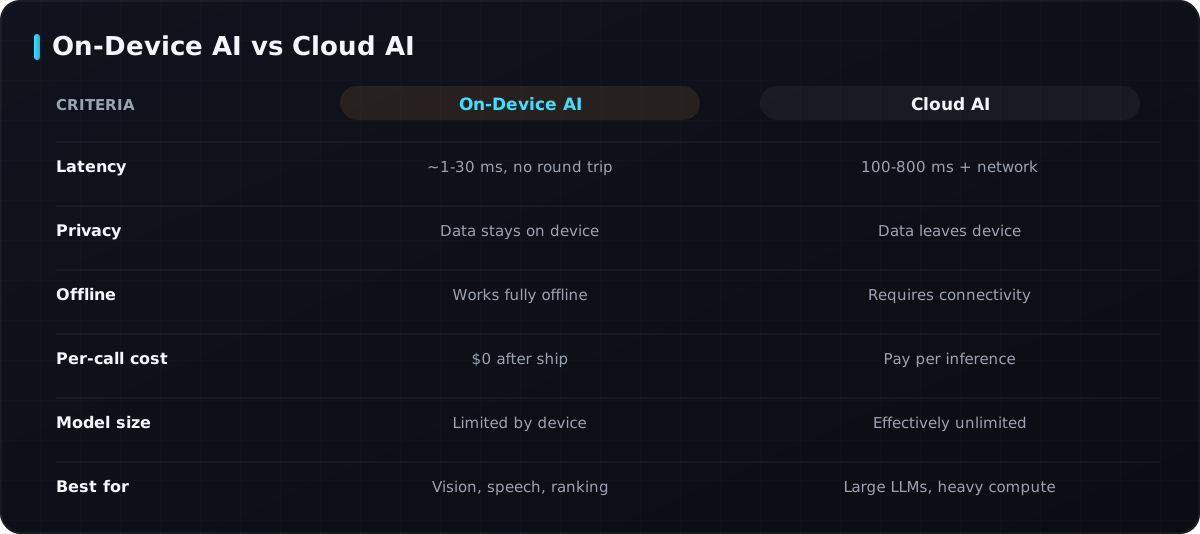 How on-device and cloud inference compare across the factors that matter to product teams.
When to Use On-Device vs Cloud
On-device AI is powerful, but it is not a universal replacement for the cloud. The right call depends on model size, how often the model changes, and how sensitive the data is.
| Use case | Best fit | Why |
|---|---|---|
| Image classification, object detection | On-device | Small models, latency-sensitive, private camera data |
| Speech-to-text, wake words | On-device | Always-on, offline, microphone privacy |
| Smart reply, autocomplete, ranking | On-device | Tiny models, instant feedback |
| Large LLM chat, document analysis | Cloud | Models too big for phones; need frequent updates |
| Generative images / video | Cloud (mostly) | Heavy compute, large weights |
| Personal data summarization | Hybrid | Run locally when possible, fall back to cloud |
A practical rule: if the model fits comfortably on the device and the data is sensitive or latency-critical, run it on-device. When you need a 70B-parameter LLM or models you retrain weekly, the cloud still wins. Many production apps Space2Code builds use a hybrid architecture — on-device for the fast, private path and cloud for the heavy lifting.
The On-Device Runtimes You Should Know
Core ML (iOS)
Core ML is Apple's native framework. You convert a trained model (PyTorch, TensorFlow) into the .mlpackage format with coremltools, and Core ML automatically routes execution across CPU, GPU, and the Neural Engine. It is the default choice for iOS-only or Apple-first products and integrates tightly with the Vision, Sound Analysis, and Natural Language frameworks.
TensorFlow Lite / LiteRT (Android)
Google rebranded TensorFlow Lite as LiteRT ("Lite Runtime"). It runs .tflite models with hardware delegates (NNAPI, GPU, Hexagon) for acceleration on Android. LiteRT is cross-platform — it also runs on iOS — making it a strong pick for React Native and Flutter teams who want one model format across both platforms.
Gemini Nano
Gemini Nano is Google's smallest Gemini model, designed to run on-device via Android's AICore system service. It powers features like summarization and smart reply on supported Pixel and flagship devices without sending text to the cloud — a glimpse of practical on-device generative AI.
ML Kit
ML Kit is Google's high-level SDK with ready-made, on-device APIs: barcode scanning, text recognition (OCR), face detection, pose detection, translation, and more. If your need maps to an existing ML Kit feature, you skip model training entirely and ship in days.
ONNX Runtime Mobile
ONNX Runtime Mobile runs models in the open ONNX format across iOS and Android. It is ideal when you already have ONNX models, want maximum framework portability, or need a single runtime shared with a backend or desktop app.
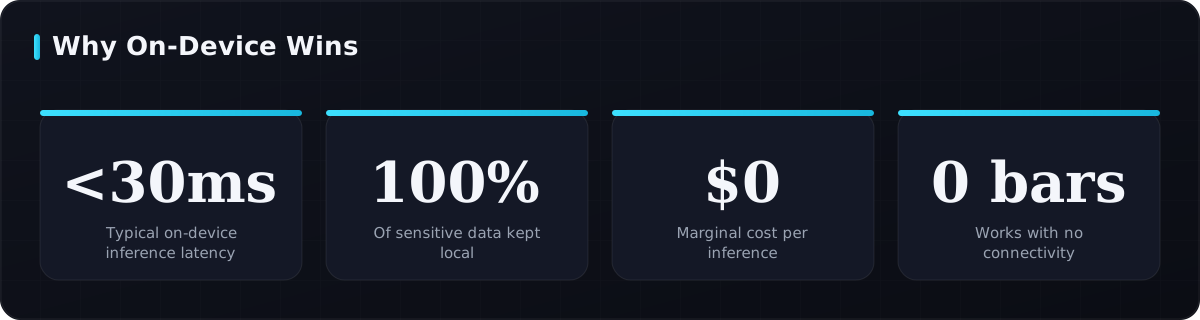 Representative gains teams see when moving the right workloads to on-device inference.
Making Models Fit: Optimization for On-Device AI
The hard part of on-device AI for mobile apps is shrinking models to fit memory and battery budgets without wrecking accuracy. Two techniques do most of the work.
Quantization
Quantization reduces the numerical precision of weights — typically from 32-bit floats to 8-bit integers, or even 4-bit. This can cut model size by roughly 4x and speed up inference dramatically on NPUs, usually with only a small accuracy drop. It is the single highest-leverage optimization for mobile.
Distillation
Knowledge distillation trains a small "student" model to mimic a large "teacher" model. The student keeps most of the teacher's accuracy at a fraction of the size — perfect when you need a capable model under a few megabytes.
Other tactics worth combining:
- Pruning — remove low-impact weights and connections.
- Operator fusion — merge layers so the runtime does fewer passes.
- Hardware delegates — offload to the NPU or GPU instead of the CPU.
A Quick Code Example
Here is a minimal example of converting a PyTorch model to Core ML with int8 quantization, then loading it for inference on iOS. The same model could be exported to .tflite or ONNX for Android.
import torch
import coremltools as ct
from coremltools.optimize.coreml import (
    OpLinearQuantizerConfig, OptimizationConfig, linear_quantize_weights
)

# 1. Trace your trained PyTorch model
model.eval()
example = torch.rand(1, 3, 224, 224)
traced = torch.jit.trace(model, example)

# 2. Convert to Core ML
mlmodel = ct.convert(
    traced,
    inputs=[ct.ImageType(name="image", shape=example.shape)],
    minimum_deployment_target=ct.target.iOS17,
)

# 3. Quantize weights to 8-bit to shrink size & speed up the Neural Engine
config = OptimizationConfig(
    global_config=OpLinearQuantizerConfig(mode="linear_symmetric", weight_threshold=512)
)
mlmodel = linear_quantize_weights(mlmodel, config=config)

mlmodel.save("Classifier.mlpackage")  # ship this in your iOS app bundle
On the Swift side you load Classifier.mlpackage and call prediction(from:) — inference runs locally on the Neural Engine, typically in well under 30 ms.
Trade-offs to Plan For
On-device AI is not free of friction. Budget for these realities early:
- Binary size. Models add megabytes to your app download. Use on-demand resources or download models post-install when size matters.
- Device fragmentation. Older phones lack NPUs; always provide a graceful CPU fallback or cloud fallback.
- Model updates. Shipping a new model means an app update or a model-download pipeline — plan for over-the-air model delivery.
- Battery and thermals. Continuous inference (for example, real-time video) can heat the device, so throttle frame rates when you can.
How Space2Code Approaches On-Device AI
When we scope an AI mobile project, Space2Code starts with the data and the latency requirement, not the framework. We map each feature to on-device, cloud, or hybrid, pick the runtime that matches your stack (Core ML for Apple-first, LiteRT for cross-platform React Native and Flutter), and apply quantization or distillation so the model fits the smallest device you support. The result is an app that feels instant, respects user privacy, and keeps your inference bill near zero.
Frequently Asked Questions
Is on-device AI more private than cloud AI?
Generally, yes. Because inference happens locally, sensitive inputs like photos, voice, and health data never leave the phone. That reduces breach surface area and simplifies compliance with GDPR and HIPAA, though you should still document your data handling clearly.
Can large language models run on-device?
Small and quantized LLMs can. Models like Gemini Nano and 1-3B-parameter open models run on flagship phones for tasks such as summarization and smart reply. Very large models with tens of billions of parameters still need the cloud, so a hybrid approach is common.
Does on-device AI work in React Native and Flutter?
Yes. LiteRT and ONNX Runtime both ship cross-platform, and there are mature plugins for React Native and Flutter. Core ML and ML Kit are also accessible through native bridges, so you can deliver on-device features in a single cross-platform codebase.
How much accuracy do I lose with quantization?
Usually only a small amount. 8-bit quantization often costs 1-2% accuracy or less, and quantization-aware training can recover most of that. The size and speed gains almost always justify the trade-off for mobile.
Conclusion
On-device AI for mobile apps is one of the highest-leverage moves you can make in a modern mobile product — faster, more private, offline-capable, and cheaper at scale. The key is matching each feature to the right place (device, cloud, or hybrid) and optimizing models to fit real hardware. If you are evaluating an AI-powered app and want a partner who ships production on-device and cloud AI, Contact Space2Code and let's map your roadmap.
Tags
Need Help with Mobile Development?
Our team of experts is ready to help you build your next project.
Get Free Consultation