AI mobile app development has moved from a competitive edge to a baseline expectation. In 2026, users assume their apps can understand language, see images, predict intent, and personalize every screen. This guide walks founders, product managers, and CTOs through what AI mobile app development actually involves: the real use cases, the tech stack (LLM APIs vs on-device models), architecture, a step-by-step build process, realistic costs, and how to choose the right partner.
What "AI Mobile App Development" Actually Means
At its core, AI mobile app development is the practice of embedding machine learning and large language models into iOS and Android apps so they can reason over data, media, and natural language. It is less about adding a chatbot bubble and more about rethinking how features behave when the app can understand context.
Three layers matter:
- The model layer — an LLM, a vision model, a speech model, or a small on-device network.
- The orchestration layer — prompts, retrieval, tool-calling, and business logic that turn raw model output into safe, useful results.
- The app layer — your React Native or Flutter UI, where latency, offline behavior, and UX make or break adoption.
The hard part is rarely the model. It is the engineering glue, the evaluation, and the cost control around it.
Real Use Cases That Move Metrics
Not every app needs AI. The ones that benefit usually fall into four buckets.
Personalization
Recommendation and ranking engines tailor feeds, products, and content to each user. This is the highest-ROI use case for e-commerce, media, and fintech apps, often lifting engagement and conversion measurably.
Computer Vision
Camera-driven features: scanning documents, detecting objects, reading receipts (OCR), measuring rooms, verifying identity, or classifying product photos. Vision turns the phone camera into a sensor.
Voice & Natural Language
Voice commands, dictation, and conversational assistants let users skip menus entirely. Paired with an LLM, a single text box can replace a dozen screens of navigation.
Predictive Intelligence
Forecasting churn, surfacing the right notification at the right time, anomaly detection, or smart autofill. Predictive features feel "magic" precisely because they reduce taps.
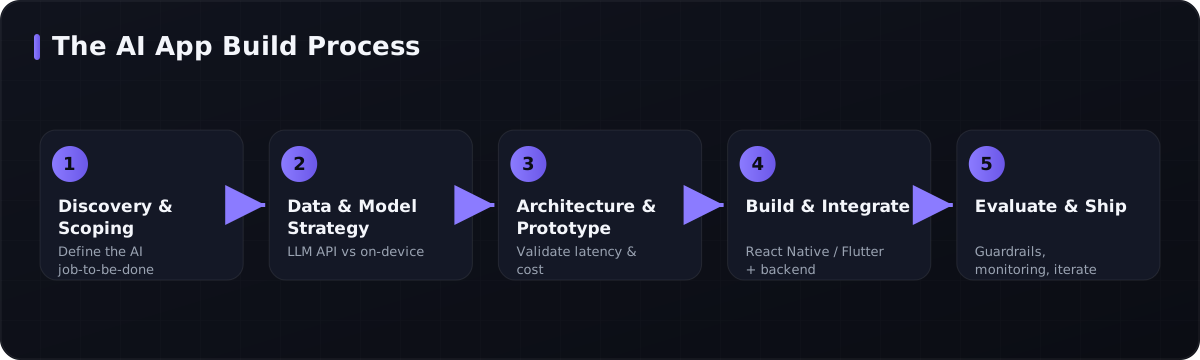 The end-to-end build process for shipping an AI-powered mobile app.
The Tech Stack: LLM APIs vs On-Device AI
The single biggest architectural decision in AI mobile app development is where the model runs. In practice, you will usually blend both approaches.
| Factor | Cloud LLM / API | On-Device AI |
|---|---|---|
| Capability | Highest (large models, multimodal) | Limited to small models |
| Latency | Network-bound (200ms–2s+) | Instant, no round-trip |
| Cost | Per-token / per-call, recurring | Compute is "free" after ship |
| Privacy | Data leaves device | Stays on device |
| Offline | Requires connectivity | Works fully offline |
| Best for | Complex reasoning, generation | Vision, voice, real-time, privacy |
Cloud LLM APIs (such as the Claude, GPT, or Gemini families) are ideal for conversational assistants, summarization, content generation, and anything needing strong reasoning. You trade recurring cost and latency for raw capability.
On-device AI runs models locally using Core ML (iOS), TensorFlow Lite / LiteRT, ONNX Runtime, or MediaPipe. It shines for camera and voice features where every millisecond and every privacy guarantee counts.
A common production pattern is a hybrid: run a small on-device model for instant, private inference, and escalate to a cloud LLM only when the task requires heavier reasoning.
React Native vs Flutter for AI Apps
Both cross-platform frameworks ship excellent AI apps. The choice rarely depends on AI itself, but here is how they compare.
| Factor | React Native | Flutter |
|---|---|---|
| On-device ML | TFLite, ONNX, Core ML via native modules | Strong plugin ecosystem (tflite_flutter, google_mlkit) |
| LLM API calls | Trivial (any HTTP/streaming client) | Trivial (Dio, http) |
| Streaming UX | Mature; great for token streaming | Excellent; smooth custom UI |
| Native bridging | Turbo Modules / JSI for heavy compute | Platform channels / FFI |
| Team fit | JS/TS teams, web overlap | Teams wanting one codebase, custom UI |
At Space2Code we build in both. The deciding factors are your existing team skills, UI complexity, and how much custom native ML bridging you expect.
Architecture of a Production AI App
A reliable AI mobile app is more than "app calls model." A solid architecture separates concerns:
- Mobile client (React Native / Flutter) handles UI, on-device inference, and streaming.
- Backend / BFF (Node.js, NestJS, or FastAPI) holds API keys, applies rate limiting, caching, and business logic — never call paid LLM APIs directly from the device.
- Orchestration layer manages prompts, retrieval-augmented generation (RAG), tool-calling, and guardrails.
- Data layer stores embeddings (a vector database), user context, and logs for evaluation.
- Observability tracks latency, cost per request, and output quality.
Here is a minimal sketch of the hybrid escalation pattern in a React Native component.
// Try fast on-device inference first; fall back to a cloud LLM.
async function answer(query: string, image?: ImageData) {
  const local = await onDeviceModel.classify(image); // Core ML / TFLite

  if (local.confidence > 0.85) {
    return local.label; // instant, private, free
  }

  // Escalate to the backend, which holds the API key + guardrails
  const res = await fetch(`${API_URL}/ai/answer`, {
    method: "POST",
    headers: { "Content-Type": "application/json" },
    body: JSON.stringify({ query, hint: local.label }),
  });
  return res.json(); // streamed LLM response
}
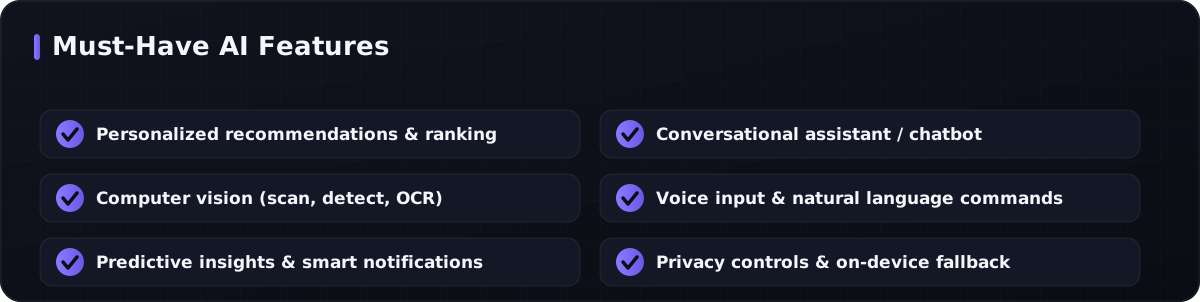 Core capabilities most successful AI mobile apps ship with.
A Step-by-Step Build Process
A disciplined process keeps AI projects from drifting into expensive science experiments.
- Discovery & scoping. Pin down the AI job-to-be-done and the metric it should move. Vague goals ("add AI") burn budgets.
- Data & model strategy. Decide cloud vs on-device per feature. Audit data availability, privacy, and licensing.
- Architecture & prototype. Build a thin vertical slice to validate latency and cost with real prompts before committing to full UI.
- Build & integrate. Implement the mobile app, backend, and orchestration. Add streaming UX so the app feels fast even when the model is thinking.
- Evaluate & harden. Create an eval set, add guardrails against hallucination and prompt injection, and test edge cases.
- Ship & iterate. Monitor cost-per-user, quality, and engagement; refine prompts and retrain models on real usage.
The teams that succeed treat evaluation as a first-class deliverable, not an afterthought.
Costs & Timeline at a Glance
Numbers vary by scope, but these ranges help set expectations for any AI mobile app development project.
| Scope | Timeline | Indicative cost |
|---|---|---|
| AI-feature MVP (one feature, cross-platform) | 6–10 weeks | $20k–$45k |
| Mid-size AI app (3–5 AI features + backend) | 3–5 months | $45k–$120k |
| Complex / on-device + RAG platform | 6–9 months | $120k+ |
Two ongoing costs people forget: recurring LLM API usage (which scales with active users) and evaluation/maintenance to keep model quality from drifting. Hybrid on-device inference is the most effective lever for controlling per-user API spend at scale.
How to Pick an AI Development Partner
Look for a team that is fluent in both mobile and applied AI — not one or the other. Strong signals include:
- Shipped AI in production, not just demos — ask about latency, cost control, and guardrails.
- Full-stack depth: mobile (React Native/Flutter), backend (Node.js, FastAPI), and ML/LLM orchestration under one roof.
- A clear evaluation methodology for measuring and improving model output.
- Honest advice on when not to use AI — a partner who scopes ruthlessly saves you money.
Space2Code combines mobile, backend, and AI/ML expertise — from LLM-powered chatbots and computer vision to on-device inference — so the model layer and the app layer are built by one accountable team.
Frequently Asked Questions
How much does it cost to build an AI mobile app?
A focused AI MVP with one strong feature typically runs $20k–$45k over 6–10 weeks. Larger multi-feature apps with custom backends and RAG range from $45k to well over $120k. Remember to budget for recurring LLM API usage and ongoing evaluation.
Should I use a cloud LLM or on-device AI?
Use cloud LLMs for complex reasoning, generation, and conversation; use on-device models for vision, voice, real-time, offline, and privacy-sensitive features. Most production apps use a hybrid that runs on-device first and escalates to the cloud only when needed.
Is React Native or Flutter better for AI apps?
Both handle LLM API calls and on-device ML well. Choose React Native if your team is JS/TypeScript-heavy or shares code with a web app; choose Flutter for highly custom UI from a single codebase. The framework rarely limits your AI ambitions.
How long does AI mobile app development take?
A prototype validating a single AI feature can be ready in a few weeks. A polished, production-grade AI app with multiple features, a secure backend, and evaluation usually takes 3–6 months depending on scope and on-device requirements.
Ready to Build Your AI App?
AI mobile app development rewards teams that scope sharply, validate latency and cost early, and treat evaluation as core engineering. Whether you need a personalized feed, a vision feature, a voice assistant, or a full on-device AI platform, the right architecture and partner make the difference between a demo and a product. Contact Space2Code to scope your AI mobile app — our team will help you choose the right stack, design the architecture, and ship something users actually love.
Tags
Need Help with AI & Machine Learning?
Our team of experts is ready to help you build your next project.
Get Free Consultation