Adding an AI chatbot in a React Native app is one of the highest-leverage features you can ship in 2026: it turns a static interface into a conversational assistant that answers questions, automates support, and guides users through your product. But doing it well means more than wiring a text box to an LLM. This guide from the Space2Code Team walks through the full architecture — from the React Native client to your backend to the model — plus streaming, memory, RAG, UI/UX, guardrails, and cost control.
The Core Architecture: Never Call the LLM Directly
The single most important rule when building an AI chatbot in a React Native app: the mobile client should never talk to the LLM provider directly. Anything shipped in your app bundle — including API keys — can be extracted. Instead, route every request through a backend you control.
The three-tier flow looks like this:
- React Native client — captures the user's message, holds the visible conversation, and renders streamed responses.
- Your backend (Node.js, NestJS, FastAPI, or Django) — authenticates the user, enforces rate limits, assembles the prompt, runs retrieval, and calls the LLM.
- The LLM provider — generates the response, ideally streamed back token by token.
This proxy pattern gives you a security boundary, a place to inject context and guardrails, and a single point for logging and cost tracking. At Space2Code we treat the backend as the brain of the assistant; the app is just a thin, fast presentation layer.
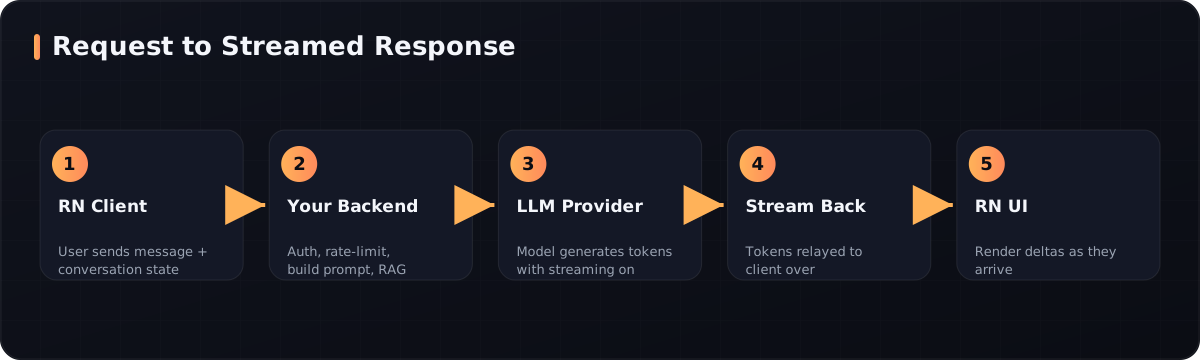 How a message travels from the React Native client through your backend to the LLM and streams back token by token.
Streaming Responses for a Fast, Native Feel
LLMs generate text token by token. If you wait for the entire response before showing anything, users stare at a spinner for several seconds. Streaming flips this: tokens appear as they are generated, so perceived latency drops sharply and the assistant feels alive.
Your backend keeps a streaming connection open to the model and relays each chunk to the client over Server-Sent Events (SSE) or chunked HTTP. On the React Native side, you read the response body incrementally and append each delta to the message state.
A Concise React Native Streaming Snippet
Here is a minimal client-side fetch that reads a streamed response from your backend and updates the UI as tokens arrive:
async function streamChat(messages, onToken) {
  const res = await fetch("https://api.yourapp.com/chat", {
    method: "POST",
    headers: {
      "Content-Type": "application/json",
      Authorization: `Bearer ${await getAuthToken()}`,
    },
    body: JSON.stringify({ messages }),
    reactNative: { textStreaming: true }, // enables streaming on RN's fetch
  });

  const reader = res.body.getReader();
  const decoder = new TextDecoder();

  while (true) {
    const { value, done } = await reader.read();
    if (done) break;
    // Backend emits SSE lines: "data: <token>\n\n"
    decoder
      .decode(value, { stream: true })
      .split("\n\n")
      .filter((line) => line.startsWith("data: "))
      .forEach((line) => onToken(line.replace("data: ", "")));
  }
}
The reactNative: { textStreaming: true } flag is the key detail — without it, React Native buffers the whole body and you lose streaming. On the backend, you use the LLM SDK's streaming helper (for example, an Anthropic Claude client.messages.stream(...) call with a model such as claude-opus-4-8 and a generous max_tokens) and write each text delta to the response as an SSE data: line.
Managing Context and Memory
An LLM is stateless — it only knows what you send in each request. To make the chatbot feel like it remembers the conversation, you resend the relevant history every time. But you cannot resend everything forever: every model has a finite context window, and every token costs money and adds latency.
A practical memory strategy combines three layers:
- Short-term: the last several turns, sent verbatim with each request.
- Summarized mid-term: once the conversation grows, compress older turns into a running summary the model can still draw on. Many modern providers also offer server-side compaction that does this automatically.
- Long-term: persist durable facts (preferences, account context) in your own database and inject the relevant slice per request.
Trim aggressively. Keep the system prompt frozen and stable so it can be cached, and append volatile, per-turn content at the end. This both controls cost and improves response quality, since the model isn't wading through irrelevant history.
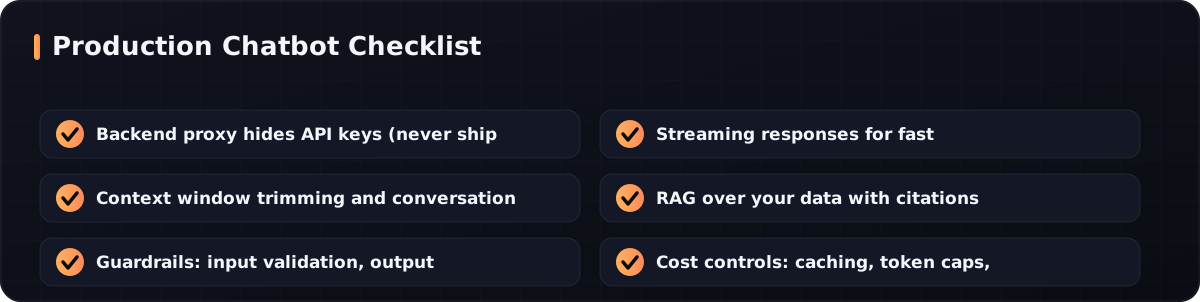 What to verify before you ship an AI assistant inside a mobile app.
RAG: Grounding the Chatbot in Your Own Data
Out of the box, an LLM only knows its training data — not your product docs, your knowledge base, or your user's order history. Retrieval-Augmented Generation (RAG) fixes this by fetching relevant information at query time and feeding it to the model alongside the user's question.
The standard pipeline:
- Ingest your documents and split them into chunks.
- Embed each chunk into a vector and store it in a vector database.
- Retrieve the most relevant chunks for each incoming question via semantic search.
- Augment the prompt with those chunks, then generate the answer.
Crucially, ask the model to cite its sources from the retrieved chunks. Citations dramatically reduce hallucinations and let users verify answers — essential for support and any high-trust use case. RAG is what turns a generic chatbot into an assistant that actually knows your business.
UI/UX Tips for Mobile Chat
A great conversational experience on mobile is built from small, deliberate details:
- Stream visibly. Show a typing/streaming indicator and append tokens live so the first character appears in well under a second.
- Render messages optimistically. Show the user's message instantly, mark it pending, then confirm once the backend acknowledges it.
- Auto-scroll smartly. Keep the newest message in view, but let users scroll up without yanking them back down.
- Handle interruptions. Let users stop a long generation; on mobile, network drops are common, so support graceful reconnect.
- Use suggested prompts. Starter chips lower the blank-canvas barrier and steer users toward what the assistant does well.
- Keep it accessible. Respect dynamic font sizes, contrast, and screen readers.
Small touches like haptic feedback on send and subtle micro-animations make the assistant feel genuinely native rather than a bolted-on web view.
Guardrails: Keeping the Assistant Safe and On-Topic
An unconstrained chatbot is a liability. Guardrails operate at three points:
| Layer | What it does | Example |
|---|---|---|
| Input | Validate and filter user messages | Block prompt-injection attempts, cap message length |
| System prompt | Constrain scope and tone | "You are a support assistant for X. Decline off-topic requests." |
| Output | Moderate and verify responses | Filter unsafe content, check that answers cite retrieved sources |
Also handle refusals gracefully. Modern models can decline a request for safety reasons; your backend should detect that state and return a friendly fallback message rather than an error. And always degrade gracefully when the model is rate-limited or unavailable — a clear "I'm a bit busy, try again in a moment" beats a raw 500.
Cost Control That Scales
LLM usage is billed per token, so cost discipline is part of the architecture, not an afterthought:
- Prompt caching. Keep the stable prefix (system prompt, tool definitions) byte-identical so the provider can serve it from cache at a fraction of the price.
- Right-size the model. Use a smaller, cheaper model for simple classification or routing, and reserve the flagship model for hard reasoning.
- Cap output tokens. Set a sensible
max_tokensso a runaway response can't drain your budget. - Per-user rate limits. Enforce them at the backend to stop abuse and surprise bills.
- Trim context. Every token you don't send is a token you don't pay for — summarize and prune history.
Together, caching and context trimming alone can cut LLM costs by more than half on a chat-heavy workload.
Frequently Asked Questions
Can I call the LLM directly from React Native without a backend?
Technically yes, but you should not. Your API key would be embedded in the app bundle and easily extracted, exposing you to unlimited billing abuse. A backend proxy is also where you add authentication, rate limiting, RAG, and guardrails. Always route through a server you control.
How do I stream LLM responses in React Native?
Use fetch with the reactNative: { textStreaming: true } option, then read the response body with a getReader() loop and append each chunk to your message state. Your backend relays the model's streamed tokens as Server-Sent Events. This makes the first token appear almost instantly.
What is RAG and do I need it for my chatbot?
RAG (Retrieval-Augmented Generation) retrieves relevant snippets from your own documents at query time and feeds them to the model so answers are grounded in your data. You need it whenever the assistant must answer questions about your specific product, policies, or user data — which is most real-world chatbots.
How much does an AI chatbot cost to run?
It depends on traffic, model choice, and conversation length, since billing is per token. You control costs with prompt caching, smaller models for simple tasks, output token caps, and aggressive context trimming. A well-architected assistant can serve thousands of conversations affordably; Space2Code can help you model and optimize this for your use case.
Conclusion
Building an AI chatbot in a React Native app is very achievable when you get the architecture right: a thin, streaming mobile client backed by a smart backend that handles prompts, memory, RAG, guardrails, and cost control. Nail those layers and you ship an assistant that feels fast, stays on-topic, knows your data, and scales economically. If you want a production-grade AI assistant built into your mobile app — with the backend, RAG pipeline, and guardrails done right — Contact Space2Code and let's build it together.
Tags
Need Help with AI & Machine Learning?
Our team of experts is ready to help you build your next project.
Get Free Consultation